
Promotional Sales Platform
Insightful Analytics and Reporting
Analyze your data with power and ease
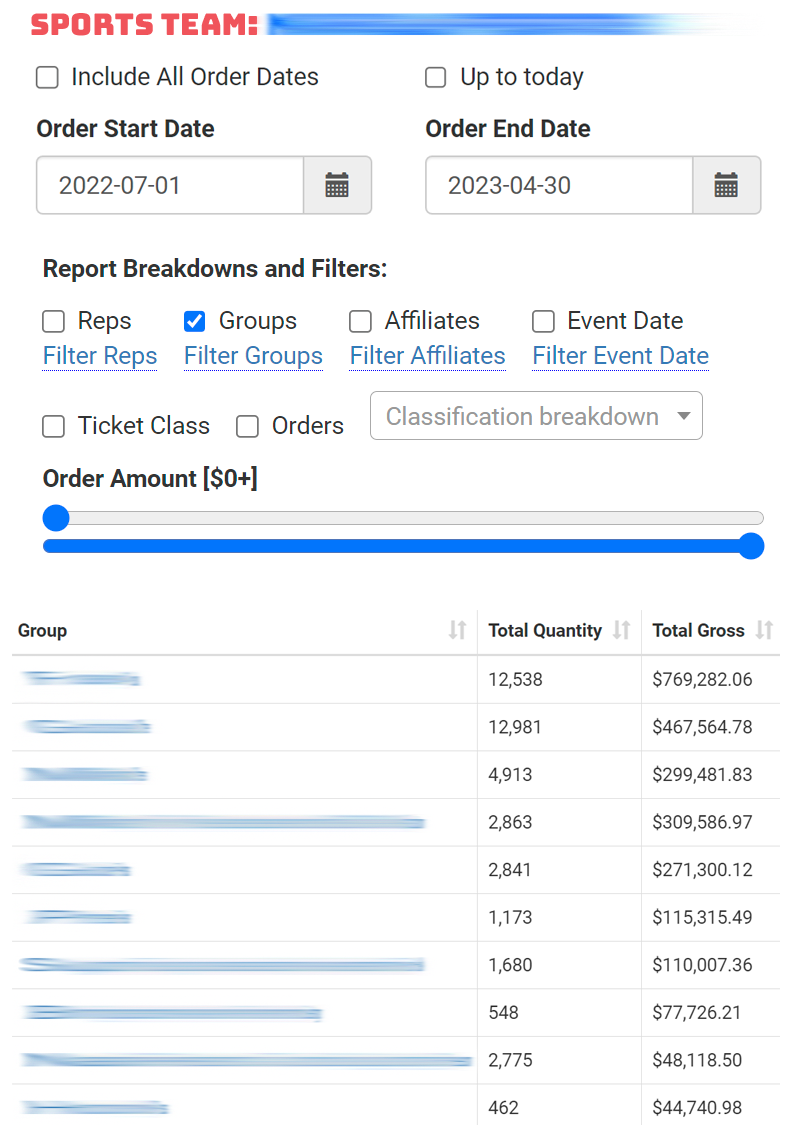
Spinzo's "flex report" offers any cut of data, broken down any way, for any date range, at any time. Spinzo's flex report allows you to view totals at a glance or get as detailed as you want. Break down sales by:
- Sales Rep
- Event Date
- Group
- Affiliate (inbound source)
- Seating Zone
- Individual Order
Filter by those same parameters. At it's most granular, this tool allows you to get right down to individual order details including names, emails, phone numbers, and seating locations. You can then filter by total spend to identify key leads for follow-up. The flex report features permalinks, which means that any slice of the data you produce is sharable, via link to anyone else with reporting access. All cuts of the data are downloadable to Excel.
Gather insights based on conversion rates
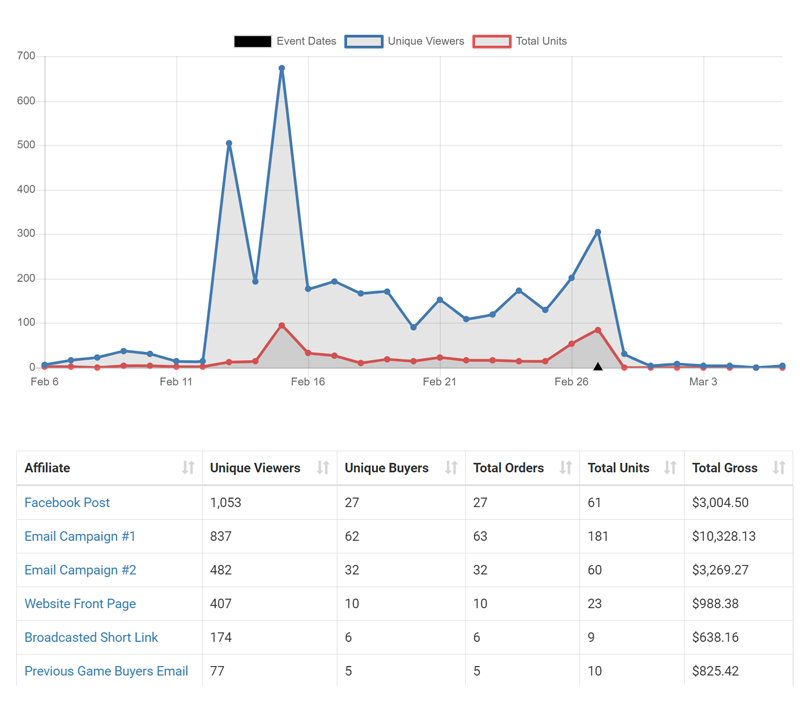
Spinzo's standard group reports showcase conversion rate data, incorporating views and ticket sales. This data can be seen overall for a group, and broken down by day, visualized on a multi-colored line chart with hovering capabilities and event dates marked.
These reports also break down totals by affiliate (inbound source) allowing you to compare totals and conversion rates across many promotion channels (e.g., Facebook, Twitter, Instagram, Outbound Email, SMS). You can create an unlimited number of promotion channels for reporting purposes. For example, set up affiliate tracking to compare conversion rates by:
- Company
- School
- Non-Profit
- Youth Sports Team
- Referral Employee
There's no time like real-time

Have TV screens around the sales floor? Spinzo's real-time reporting is perfect for those. These reports update live every second, with bar charts showing the visitor velocity across all promotions in the Spinzo platform.
Discover geo-analytics like you've never seen
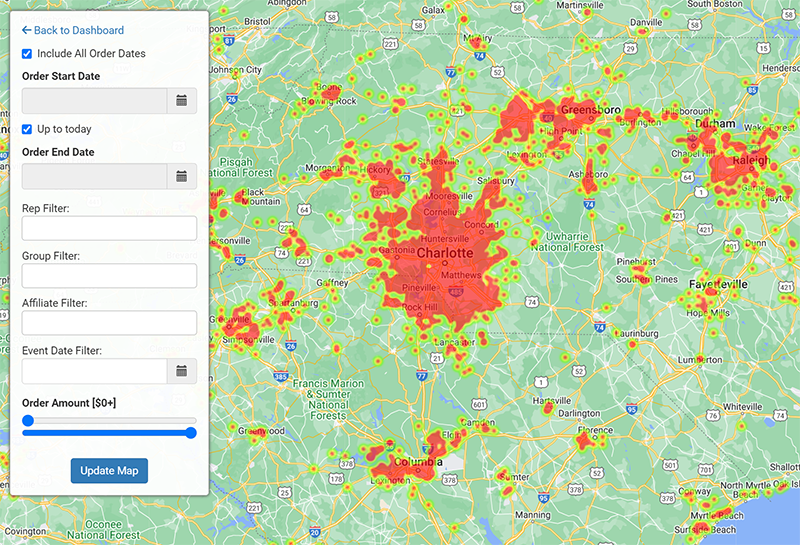
Spinzo's MapView is unmatched in its accuracy, visual representation, and ease of use. Every paid Spinzo buyer is geo-located based on precise billing address. MapView allows you to see your buyer on a heat map that can be panned or zoomed in. Colors indicate density of buyers in a particular area.
MapView can be filtered by order date range, group, affiliate, event date or spend. For example, you can look at a map of all big spenders that bought your theme night via your Facebook ad link for a particular day. You can then zoom in on a neighborhood and draw an area to extract the individual buyers in that neighborhood.
Get smart with SmartCharts
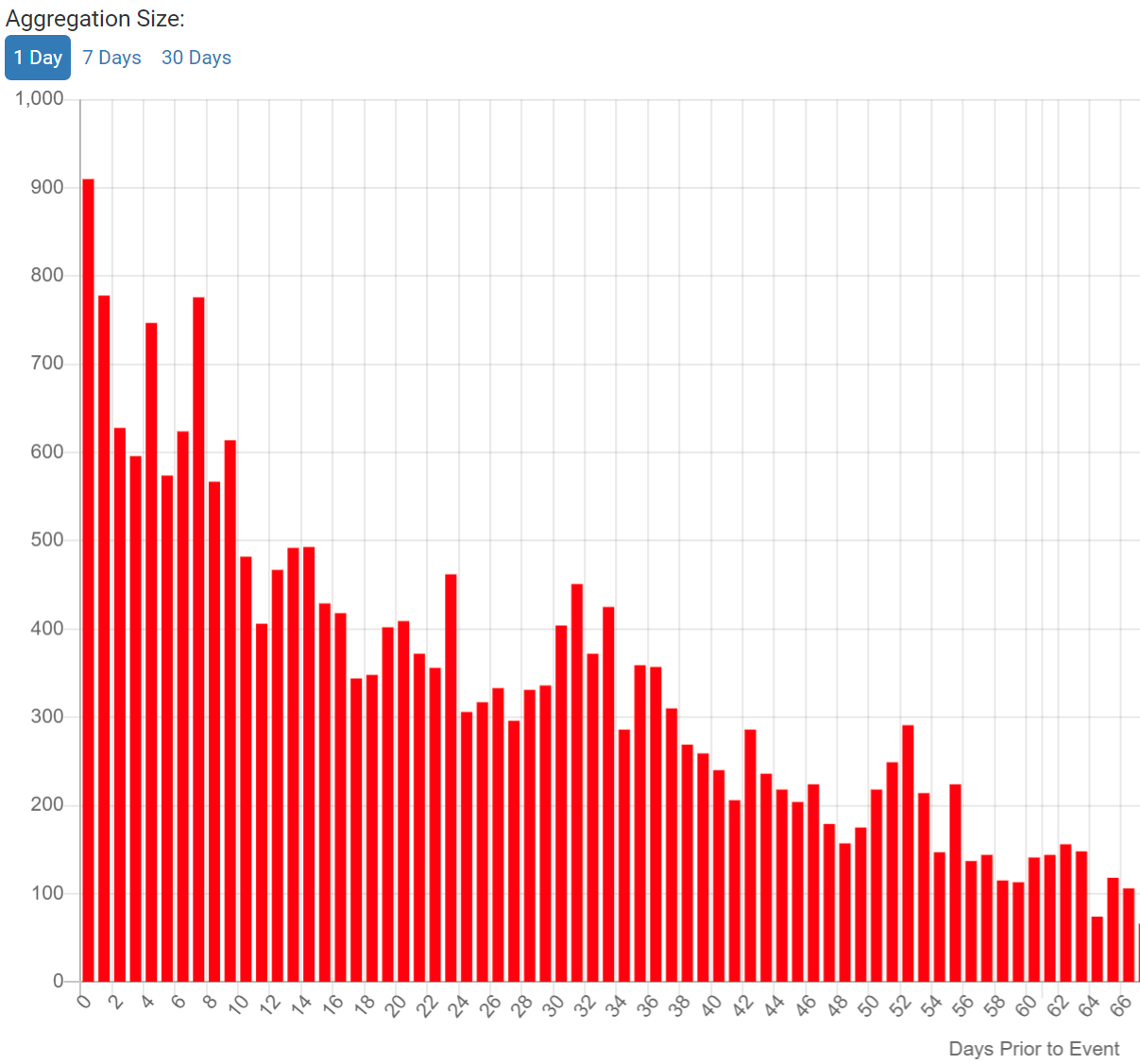
Spinzo SmartCharts show buyer habits in two ways: purchase date vis-à-vis game date, and total spend basket size. This is all represented on a histogram so that you can see how far in advance of event dates people purchase, and what is the most common basket size. Spinzo offers different aggregation intervals for spend and for date ranges (day, week, month).
Need something more specific? We got you.

Spinzo has a custom live reporting engine, permitting the production of unique reports when requested by sports teams or venues. These reports are not static. They are designed to pull live up-to-the-second data. This is useful for specific cuts of the data or analysis that isn't available on standard Spinzo reporting. For example, do you want a report of all offers that pull from DIST-OPEN within 30 days of game date which have under 10 tickets sold? Spinzo can produce you a report that showcases that in real-time.
Your data flows to you

Spinzo pushes data into your primary ticketing system, including account-level data like buyer full name, address, phone number, and email preferences. Spinzo can also push data into other info fields, including the group name, affiliate name (inbound link source), Spinzo order ID, category, or answers to specific custom questions (e.g., hand-raisers for premium seating options). Spinzo passes in the rep ID at the account-level and order level (either is optional) and can even pass in a sales source. Sales source data is "structured" as a list, which prevents reps from making errors if assigning a sales source.
Place targeted marketing pixels
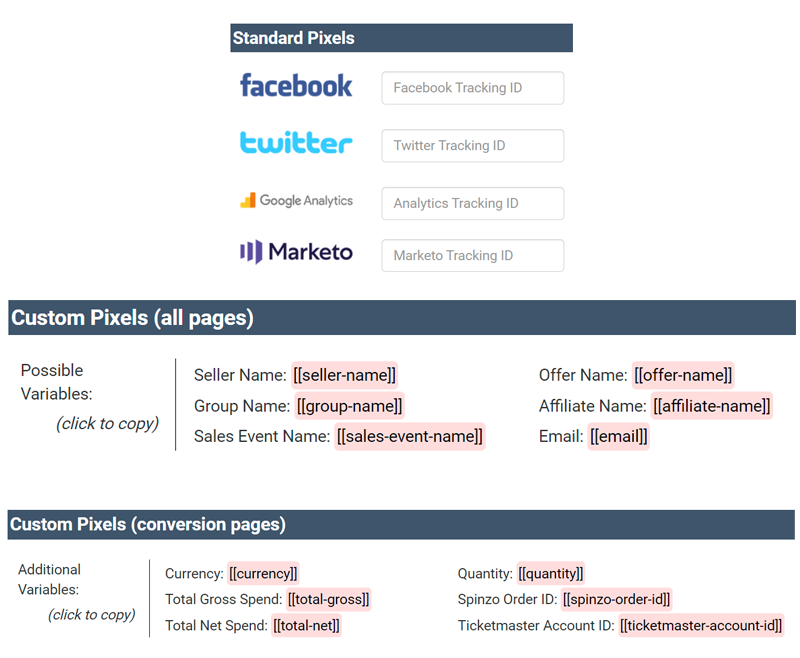
Spinzo has a fully flexible tracking pixel system. This enables sports teams and venues to place tracking pixels at any part of the buy-flow, for a particular group, event, or affiliate. Tracking pixels can be for all viewers or for conversions. Spinzo goes beyond standard pixel placement. It opens up the ability to ingest variables into pixels. Promotion name, buyer email, total spend, ticket quantity and other variables are available for automatic placement into client pixels. This means you can run highly specific retargeting campaigns. For example, you can create a retargeting campaign advertising season ticket membership only for people who spend over a certain dollar amount on certain Spinzo-powered promotions.