
Promotional Sales Platform
Intuitive Seat Allocation and Selection
Streamline your process with central seating maps
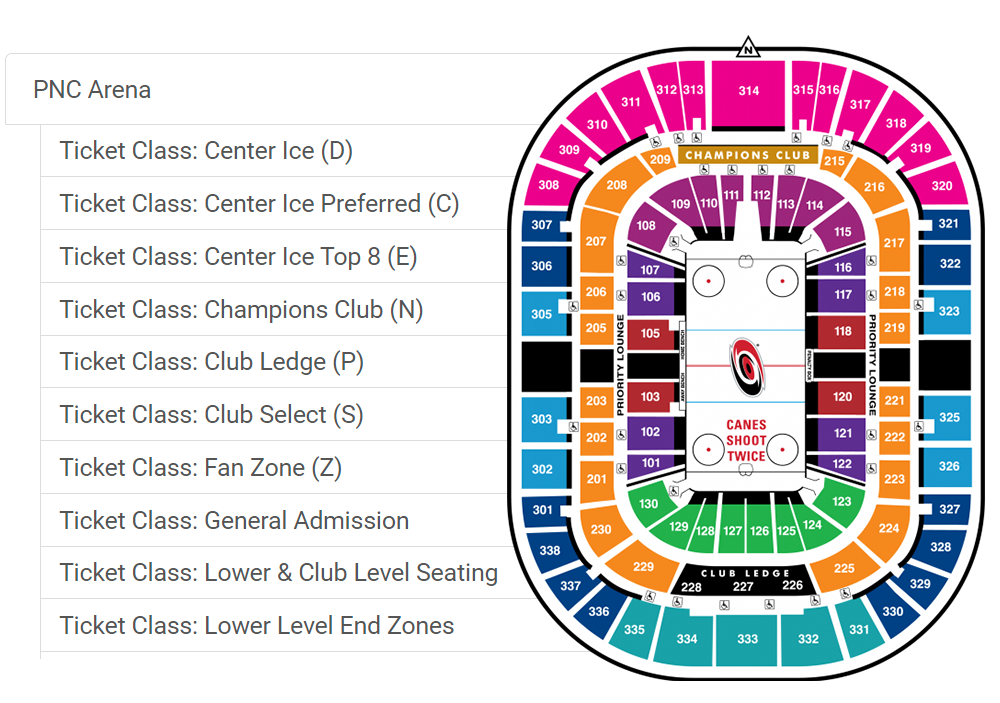
Spinzo's seating maps are included as part of the central hierarchy of the platform. You can upload an unlimited number of seating maps, to serve as different configurations for various events (games, concerts, rodeos, etc…). These maps are not just images. Spinzo allows you to assign a "price code" seating structure with color-coding. When building a promotion in Spinzo, you simply choose which seating map configuration is to be used. You then choose as many seating zones as you want and apply a price to them. Easy!
Spinzo can also feature "view from seat section" images for each seating map. When this is done, buyers can consider both the 2D seating map and the "view from seat section" when selecting where to sit.
Flexible inventory targeting

Hold Class Method
Spinzo can point to hold classes as an inventory source. Spinzo can pull from multiple hold classes at the same time, including "distribution open" (DIST-OPEN) classes, with the option to restrict a particular group link to one or more sections. In all hold class cases, Spinzo permits full seat selection to the buyer.
Reserve Method
Spinzo can point to an account reserve as an inventory source. Seats can be reserved in a fool-proof way, meaning sales reps need not worry about the "price" or the "ticket types" of the reserved seats. Spinzo has the capability to re-price and re-type tickets that were already reserved and move them onto the buyer's account upon purchase. In all reserve-method cases, Spinzo permits full seat selection to the buyer.
Two-tap seat selection
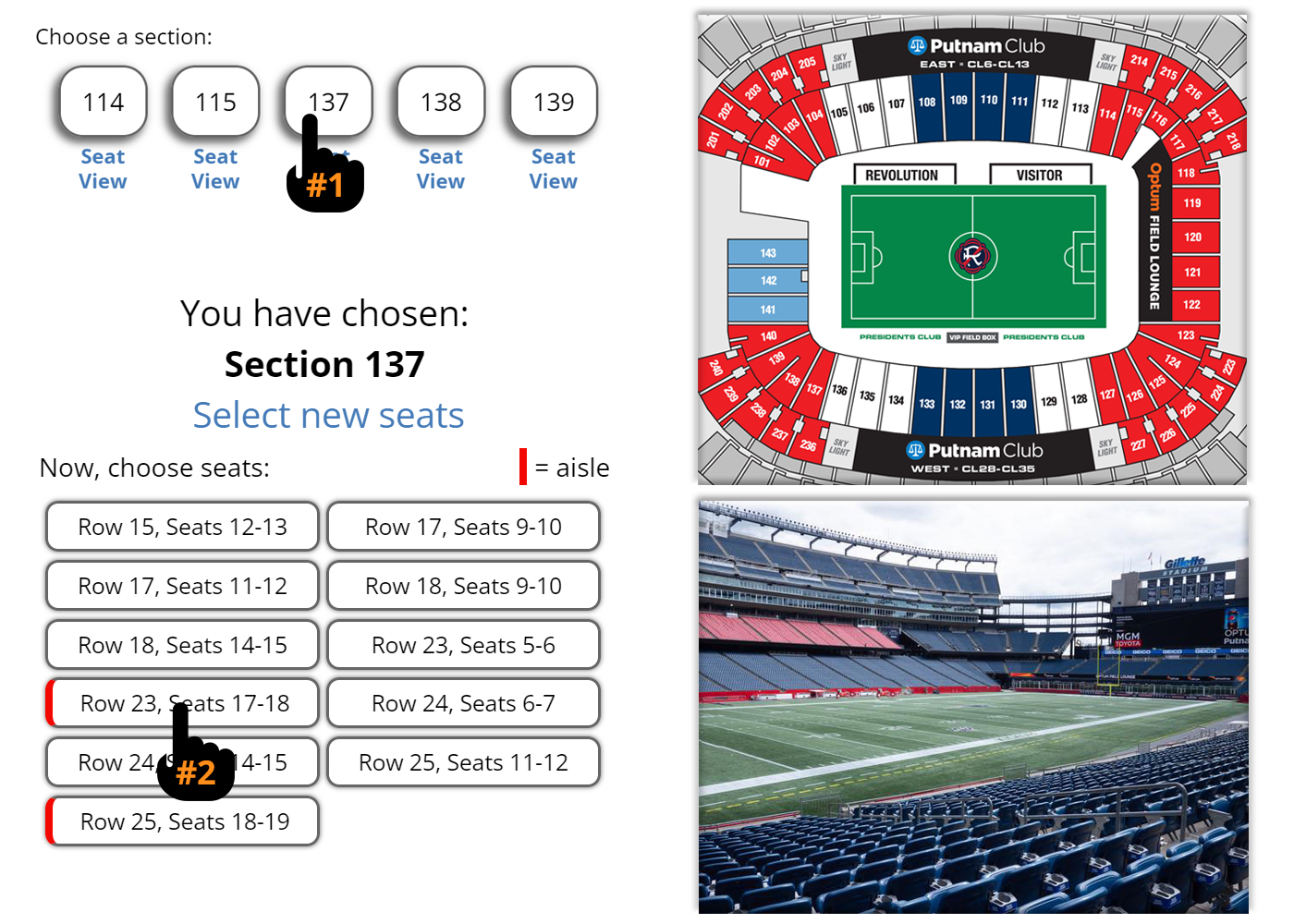
With Spinzo, buyers have a two-tap seat selection process. They don't select individual seats one-by-one, zooming in with their phone and risking selecting the wrong seats. After choosing a quantity of seats, buyers select an available section (tap #1) then a row/block (tap #2). When a large seat block is available, Spinzo provides the buyer with two options (one at each end). This means that Spinzo will NEVER be split a seat block. This unique approach optimizes sell through for future buyers, without bifurcating your seat blocks into small ones.
General admission done right

Those dreaded "GA" labels can be removed with Spinzo! When building an offer, you can choose to disable seat selection from a promotion so that buyer are not selecting "GA" sections that they are not familiar with. But as a further option, if they are "GA" seats, you can instruct Spinzo to remove those labels from all confirmation emails and screens. This creates a more pain-free buy-flow for general admission, without confusing the buyer into the seat selection.
Fool-proof inventory management and assignment

To assist with troubleshooting inventory access, Spinzo has an inventory checker on a per-event-code level. On that tool, Spinzo will show all hold classes, parent price codes (with manifested quantities per hold class), price codes (with ticket types), and prices. This tool is of great assistance when new access is granted to the platform. When assigning inventory to an offer, Spinzo also performs a full test hold and release of a seat to ensure that the person building the offer didn't make a typo or choose inventory that is unavailable. Of course, there's the ability to override the test (with proper permissions) so that offers can be built in advance of inventory being available.
Make incremental revenue with post-purchase upgrades
If you'd like to offer previous purchasers the chance to upgrade seats, you can upload past buyers as a permitted email list into Spinzo and email them out the chance to upgrade seats. For these post-purchase upgrades, Spinzo does not touch the initial seats, but has two options for how to handle the new seats. It can "Reserve" the seats onto the ticket holder’s account or it can "Sell" the seats onto a system account (not the buyer's account). In both cases, the confirmation email serves as proof of upgrade, and the upgraded seat is removed from availability. The choice of options gives Spinzo clients the flexibility as to whether they want to show the upgraded seats being "sold" or not. If "sold", it serves to increase total seat sale numbers.